Verify bleed, trim, and safe area registration before final print production. Essential for A4 documents, booklets, and professional border alignment.
Bleed & Border Alignment Test Page
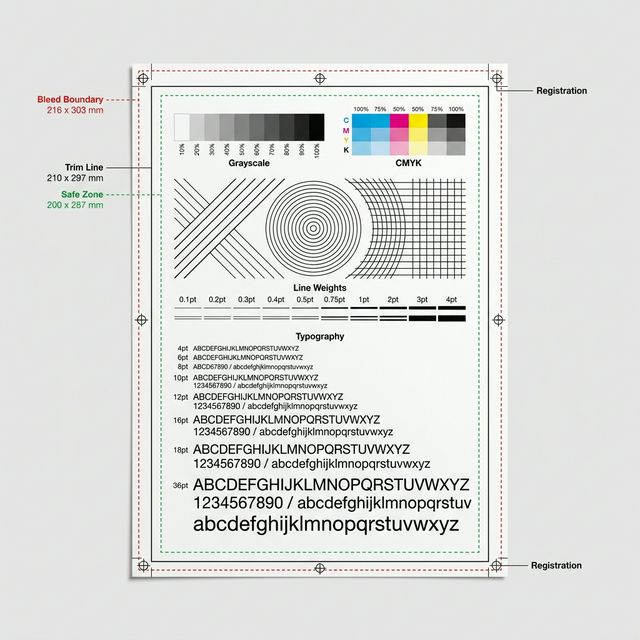
Visual Diagnostic Reference
Outer dashed line must extend to the sheet edge.
Check for corner registration accuracy.
Ensure content is centered with equal margins.
Edge-to-edge checks verify your printer's physical margin limits and feed tray registration.
Bleed & Border Alignment Test Page: How to read your result
TEST PURPOSE
<li><strong>The Clipping Zone:</strong> Look at the 5mm and 2mm border markers. Which ones were cut off?</li> <li><strong>Safe Area:</strong> Verify that your primary document content stays at least 2mm away from the farthest successfully printed line.</li> <li><strong>Expansion/Scaling:</strong> Does the printed grid match a physical ruler? If not, 'Scaling' is enabled in your driver.</li>
EXPECTED RESULT
The outer border markers should be visible on all four sides. The 10cm reference box should measure exactly 10cm with a physical ruler.
ISSUE SIGNALS
<strong>Clipped Edges:</strong> One or more sides of the grid are missing, indicating you have exceeded the printer's 'Printable Area'. <strong>Incorrect Scale:</strong> The grid looks correct but is the wrong size, meaning 'Fit to Page' is active in your PDF settings.
SUGGESTED ACTION
If your margins are uneven, see our <a href='/symptom/uneven-margins/'>Margin Cleanup Guide</a>. If you are trying to print borderless without hardware support, check our <a href='/brands/'>Manufacturer Specifications</a>.
Free and technical-first printer troubleshooting.
How We Test