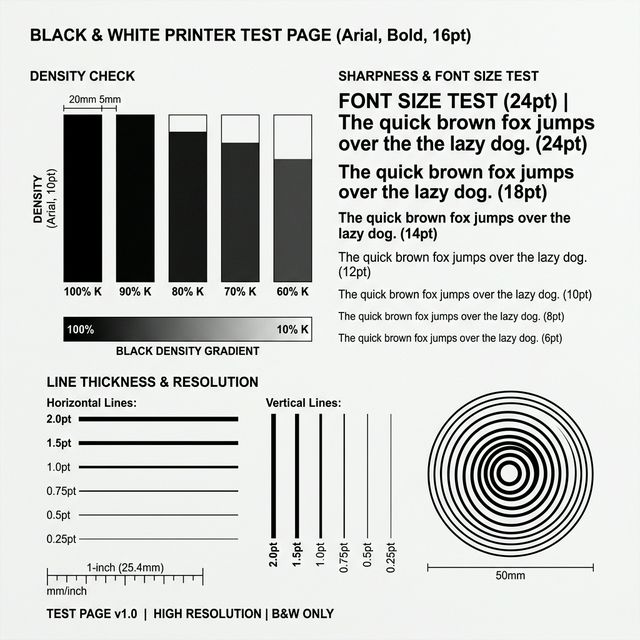
Black & White Printer Test Page (Standard)
Standardized A4 grayscale pattern. Best for diagnosing horizontal banding, low toner, and basic text legibility.
Download high-fidelity PDF instruments to diagnose horizontal banding, faded text, or alignment errors on any inkjet or laser printer. Use our standardized patterns to isolate hardware failures from software settings in seconds.
Standardized A4 grayscale pattern. Best for diagnosing horizontal banding, low toner, and basic text legibility.
High-fidelity CMYK and RGB calibration tool. Best for spotting color casts, ink contamination, and photo quality issues.
Discrete four-channel ink test. Best for identifying which specific nozzle or cartridge is failing or clogged.
Gradient and shadow density check. Best for laser fuser health and inkjet mid-tone consistency.
Geometric registration and border check. Best for fixing skewed text or uneven margins.
Detailed diagnostic steps for faded prints, missing ink colors, alignment issues, and more.
Check for dry ink or low toner first. A faded print signifies a supply-flow failure.
Complete signal loss. First check if internal test reports print.
Asymmetric feed. Check tray alignment and roller tension.
Critical fix for when printed toner does not bond to the paper and wipes off by hand.
Resolve blotchy or inconsistent color and black coverage in solid print areas.
Diagnose horizontal gaps and missing bars in your printed patterns.
Fix ink bleeding and fuzzy text edges caused by ink spreading into the paper fibers.
Black channel failure only. Crucial distinction for text-heavy offices.
Uneven margins or clipped edges? Isolate document "Printable Area" traps from mechanical paper feed errors.
Find specific diagnostic steps and recommended test pages for your printer manufacturer.
Understanding how to read your printer test page is the first step toward fixing quality issues—without expensive technician visits.
A standard test page is the only way to separate software glitches from hardware failures. It reduces variables by bypassing your Word document formatting entirely. It is significantly faster than blindly changing settings, and above all, it explicitly stops you from throwing away expensive ink cartridges to fix a problem that is actually a dirty roller.
Go to Settings > Devices > Printers. Select your printer > Manage > Print a test page.
Go to System Preferences > Printers & Scanners. Select printer > Options & Supplies > Utility > Print Test Page.
Most printers print a hardware-level test if you hold the "Resume/Cancel" button for 5 seconds until the power light flashes.
Do not guess. Match your visual defect directly to our diagnostic paths:
| Visual Issue | Likely Cause Layer | Immediate Action |
|---|---|---|
| Breaks in text or colors | Clogged Printhead Nozzle | Run CMYK Block Test |
| Light or spotty printing | Consumable Depletion | Run High-Density B&W Test |
| Misaligned grids | Carriage Timing Error | Run Printer Alignment |
| Test page will not print | Network or Driver Spooler | Start Diagnostic Walkthrough |