Geometric registration and border check. Best for fixing skewed text or uneven margins.
Printer Alignment Test Page: Registration Check
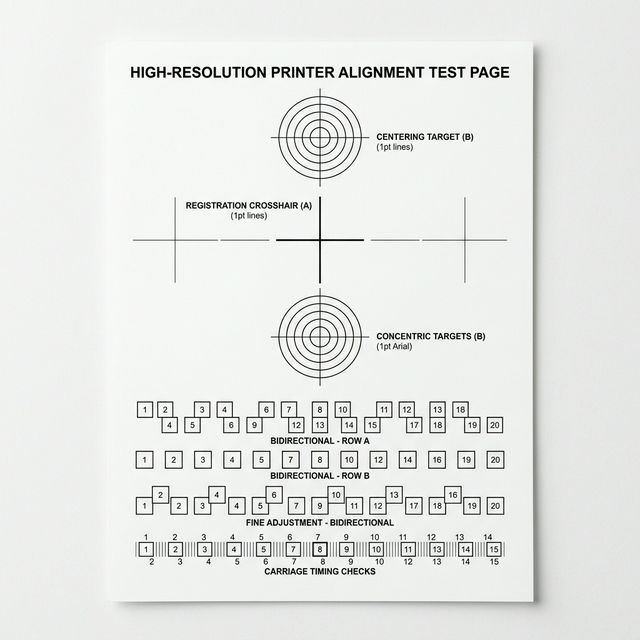
Visual Diagnostic Reference
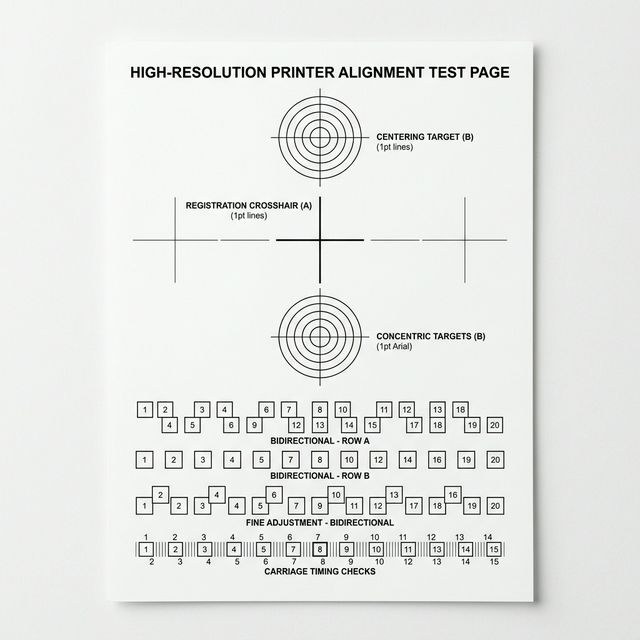
Center points must overlap perfectly without offset.
Lines must be completely straight, not jagged or staggered.
Verify lines remain parallel and do not converge or drift.
Printer Alignment Test Page: Registration Check: How to read your result
TEST PURPOSE
<li><strong>Vertical Alignment:</strong> Look at the long vertical lines. Are they perfectly straight, or do they look 'stepped' or jagged?</li> <li><strong>Horizontal Registration:</strong> Check the horizontal grid. Is the line crisp, or is there a 'ghost' or 'doubled' line next to it?</li> <li><strong>Center Cross:</strong> Ensure the primary center cross matches the 0.0 intersection exactly.</li>
EXPECTED RESULT
All lines should be singular, crisp, and meet at right angles. There should be no visible 'doubling' of text or grid lines.
ISSUE SIGNALS
<strong>Jagged Lines:</strong> Indicates the printhead or carriage needs recalibration. <strong>Doubled Images:</strong> Suggests the 'encoder strip' (the clear timing strip inside the printer) is dirty or oily.
SUGGESTED ACTION
If your lines are doubled, see our <a href='/symptom/alignment-issues/'>Alignment Diagnostics</a>. If the lines are perfectly straight but the page is crooked, see <a href='/symptom/crooked-or-skewed-prints/'>Skewed Prints Help</a>.
Free and technical-first printer troubleshooting.
How We Test